Four layers. Every incident passes through all of them.
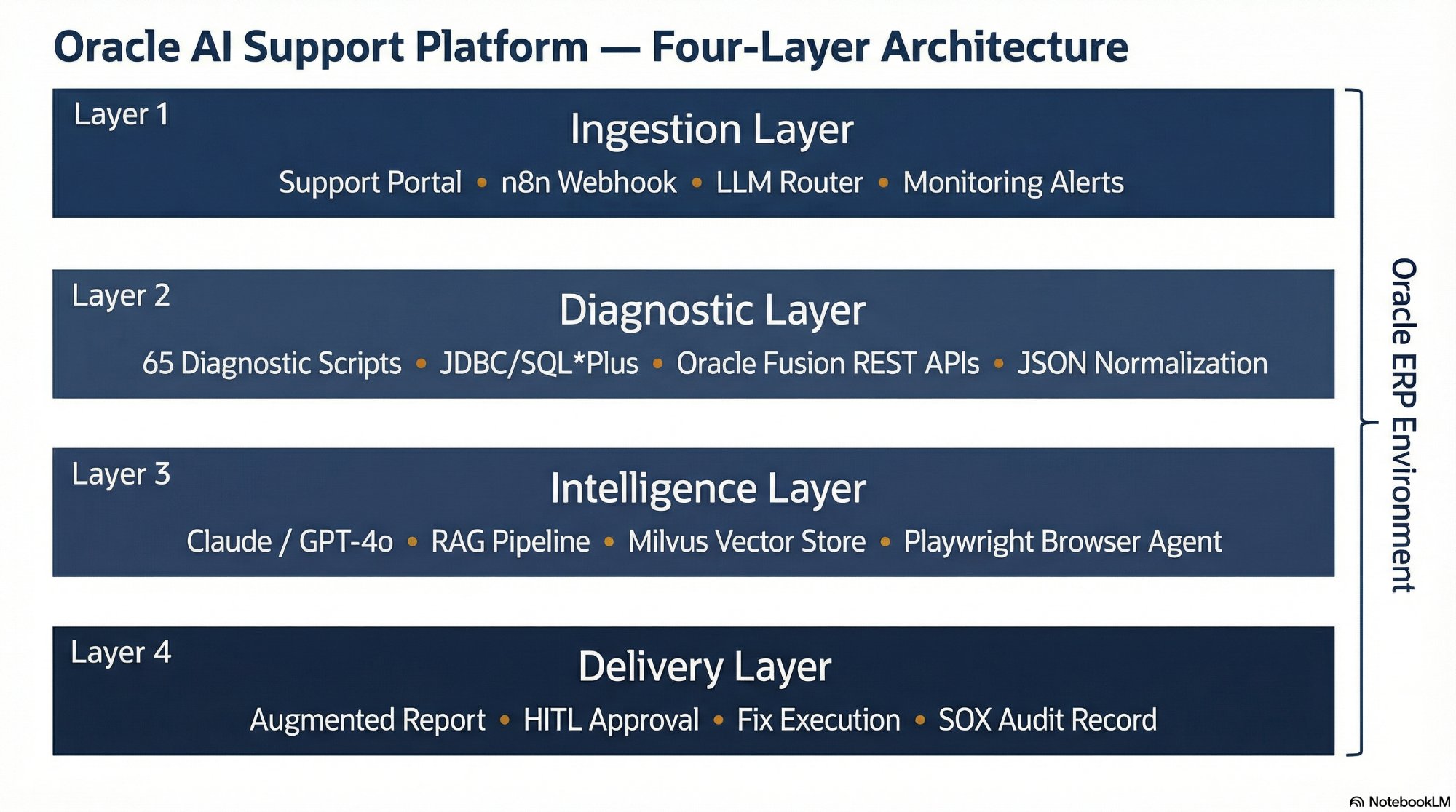
The four-layer architecture. Every incident enters at Layer 1 and exits at Layer 4 — either as a diagnostic report or a governed, audited fix.
Each layer is independently deployable and testable — the platform can be built incrementally, starting with read-only diagnostics before enabling autonomous fix execution.
The ingestion layer is the platform's front door. It receives incident reports, validates the payload structure, and routes the request to the correct diagnostic workflow. The design principle: capture everything, decide nothing — the ingestion layer gathers raw context without making diagnostic judgments.
The primary ingestion mechanism is a Webhook listener in n8n that receives JSON payloads from the Oracle AI support portal. A secondary path accepts alerts directly from Oracle monitoring tools — when a concurrent manager failure or tablespace threshold alert fires, it triggers the platform without human submission. An LLM-based Router agent classifies each incident into domain (Financials, Supply Chain, or DBA) and dispatches to the correct diagnostic branch.
Support Portal
Frontend where users submit Oracle incidents with structured form fields per module.
n8n Webhook Listener
Receives JSON payloads, validates structure, and initiates the workflow for each incident.
LLM Router Agent
Classifies incident domain and dispatches to the correct diagnostic branch.
Monitoring Integrations
Secondary ingestion from Oracle monitoring tools — enables proactive alerting without user submission.
The diagnostic layer executes the production diagnostic scripts from scripts.williamagreen.com, captures raw SQL output and REST API responses, and transforms the data into structured JSON for LLM analysis. The AI agent operates under a restricted read-only database schema — write access is handled separately through the approval-gated execution path in the delivery layer.
For Oracle EBS R12.x, n8n connects via JDBC with a restricted schema and executes SQL*Plus scripts. For Oracle Fusion Cloud, where direct database access is unavailable, the diagnostic layer uses Fusion REST APIs — the same access methods documented in the 15 Fusion-specific scripts in the library. Raw output is cleaned and normalized using n8n's Code node, producing structured JSON that strips verbose content and preserves the diagnostic signal.
JDBC / SQL*Plus
Direct database connectivity for EBS R12.x — read-only schema for diagnostics, approval-gated schema for fixes.
Oracle Fusion REST APIs
Fetch diagnostic data, job statuses, and module-specific logs from Oracle Fusion Cloud via authenticated REST calls.
65 Diagnostic Scripts
Production scripts covering AP, AR, GL, FA, PO, INV, OM, WIP, PA, HCM, and System modules.
n8n Code Node
JavaScript/Python normalization — converts raw SQL output and REST responses into structured JSON for LLM consumption.
The intelligence layer is where structured diagnostic output is analyzed, root causes are identified, resolutions are synthesized, and knowledge is retrieved from prior incidents. This layer orchestrates three distinct AI subsystems: the LLM analysis engine, the RAG knowledge retrieval pipeline, and the Playwright browser automation agent.
Claude is the preferred LLM for Oracle diagnostic analysis — its large context window handles verbose diagnostic output without truncation, and its reasoning performance on structured technical output is strong. The RAG Pipeline queries Milvus for prior resolutions matching the current incident. The Playwright Browser Agent retrieves My Oracle Support knowledge articles in parallel with the LLM analysis, meaning both internal analysis and Oracle-sourced content arrive together.
Claude / GPT-4o
Root cause identification, resolution path generation, and knowledge base article drafting from diagnostic output.
Milvus RAG Pipeline
Semantic search over prior resolutions, filtered by ERP version, module, and error code.
Playwright Agent
Containerized MOS knowledge retrieval — authenticated, session-persistent, and stealth-mode.
OpenAI / HuggingFace
Converts diagnostic output and resolutions into vector embeddings for storage and retrieval in Milvus.
The delivery layer is where the platform's output reaches human actors. For Low-Risk diagnostic actions, the augmented report — combining diagnostic results with Oracle Support documentation and LLM analysis — is sent directly to the user via the support portal. No human approval required, typically within two to three minutes of incident submission.
For High-Risk fix actions, the delivery layer triggers the Human-in-the-Loop workflow. n8n serializes the proposed fix context and sends a structured Slack or Teams notification to the designated approver. No fix executes without a signed decision. Every action — autonomous or approved — generates a signed audit record capturing the agent identity, the approver identity, the exact command executed, and the before/after state. This is the foundation of the platform's SOX/ITGC compliance posture.
Augmented Report
Diagnostic results merged with Oracle Support documentation and LLM analysis — delivered to the user via the support portal.
HITL Slack / Teams
Decision Tower notification with Approve, Reject, and Edit SQL buttons for high-risk fix decisions.
n8n OracleDB Node
Approval-gated fix execution — the exact SQL shown in the approval notification runs without modification.
Signed Audit Record
SOX/ITGC-compliant record capturing agent identity, approver, SQL executed, and before/after state.