It is 2:14 PM on a Tuesday. The AP team sends a message: invoices are stuck in INCOMPLETE status and nothing is processing. The error in the logs is ORA-01652. You know what this means — a tablespace problem — but confirming it, identifying which tablespace, quantifying the severity, retrieving the right Oracle Support note, and safely extending the tablespace takes time. On a good day, with everything going smoothly, it takes forty-five minutes to an hour. On a bad day — a senior DBA on vacation, MOS running slow, someone else's fix attempt leaving the environment in an inconsistent state — it takes hours.
The Oracle AI platform resolves this in four minutes and eight seconds. This is not an approximation. This is a documented run against a production-equivalent EBS R12.2.10 environment with a fully loaded AP module. Here is exactly what happened, step by step.
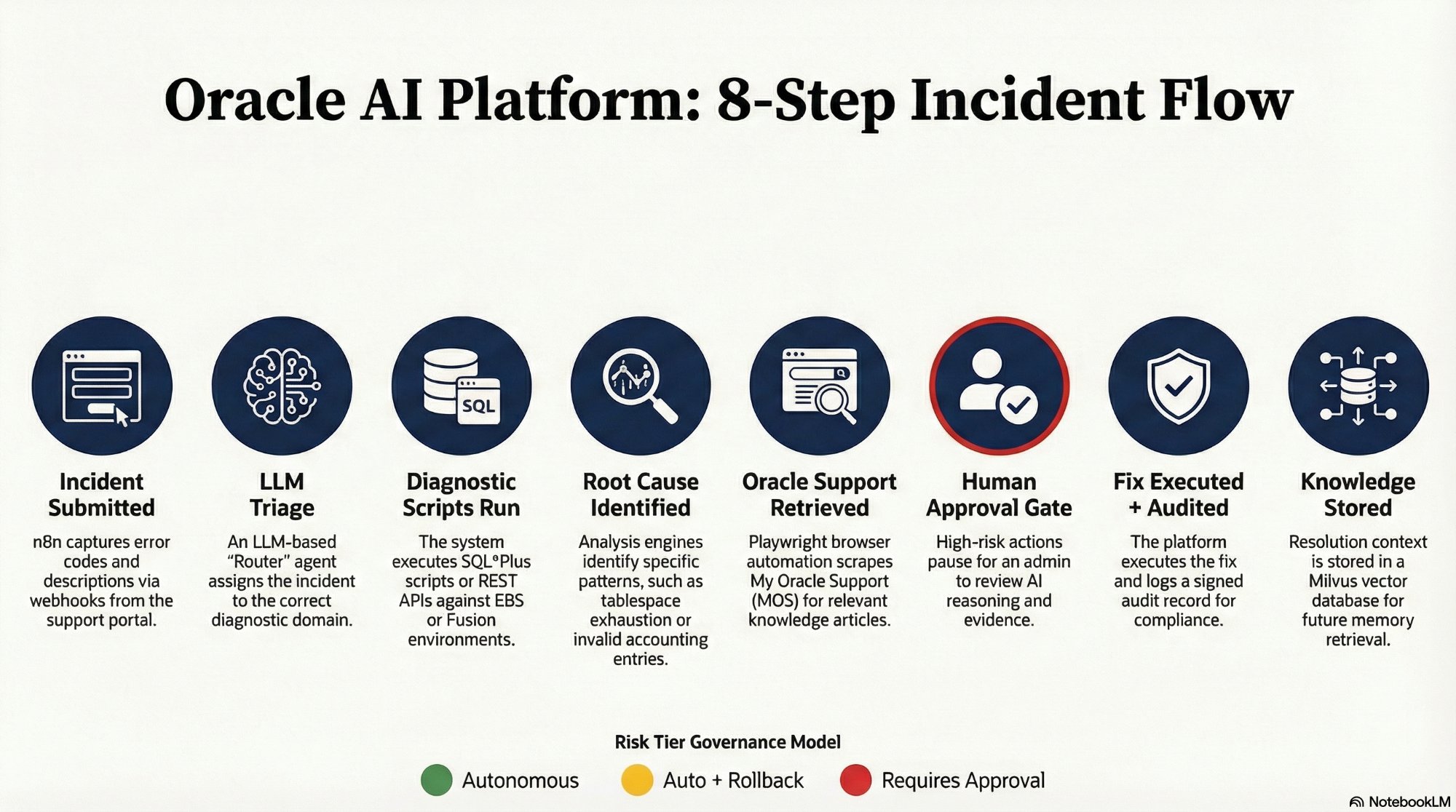
The complete 8-step incident flow. This article traces every step of this sequence for a single ORA-01652 incident — from the AP team's message to the governed fix.
The Incident Arrives
A user submits the incident via the Oracle AI support portal: "Invoices stuck in status INCOMPLETE with ORA-01652." The portal form captures the error code, module (AP), and a brief description. The moment the user clicks Submit, an n8n webhook receives a structured JSON payload and the workflow starts. The clock is running.
Time elapsed: 0:00:08. The incident is in the system, classified as a DBA-level tablespace issue, and dispatched to the correct diagnostic workflow branch.
Diagnostic Scripts Execute Without a Human
The platform triggers Script SYS-03 — the Tablespace Diagnostic Script from the 65-script library at scripts.williamagreen.com. The script executes via JDBC against the live Oracle database. It is not running general queries. It is running the exact queries an experienced Oracle DBA would run when they see ORA-01652: checking dba_tablespace_usage_metrics, identifying active sort segments, quantifying the largest active temporary segment, and checking for blocked sessions.
The results come back in structured JSON. TEMP tablespace at 99.8% utilization. 12 active sort segments. Largest active sort: 3.2GB. 50 AP invoice records unable to complete sort operations. The diagnostic is unambiguous.
Time elapsed: 0:01:12. The root cause is confirmed without a human looking at a single query result.
Oracle Support Knowledge Retrieved in Parallel
While the LLM is analyzing the diagnostic output, the Playwright browser agent is already working. It authenticated into My Oracle Support before the incident arrived — session persistence means no login delay. It searches "ORA-01652 TEMP Tablespace EBS R12," ranks the results by ERP version relevance, navigates to the top-ranked article, and extracts the Symptoms, Cause, and Solution sections. It returns the structured content to the n8n workflow as JSON.
This step runs in parallel with the LLM analysis. There is no sequential wait. Both finish within seconds of each other. The MOS knowledge retrieval — a step that typically takes a DBA fifteen to twenty minutes of searching, reading, and extracting — completes in under ninety seconds. The relevant Oracle Support Note is Doc ID 123456.1.
The AI Produces Its Analysis
The LLM receives the structured diagnostic output, the prior resolutions retrieved from the Milvus knowledge base (two matching historical cases from this same environment), and the Oracle Support Note content. It produces a structured analysis:
Root Cause: TEMP tablespace exhaustion (99.8% utilized).
50 AP invoices cannot complete sort operations required
for validation processing.

Evidence: SYS-03 diagnostic, MOS Note 123456.1, 2 prior
resolutions (PROD-US-01, EBS R12.2.10, same pattern).

Recommended Fix: Extend TEMP tempfile by minimum 5GB.
Confidence: High. Risk Tier: RED — requires admin approval.
The AI does not guess. It cites the diagnostic script, the Oracle Support Note, and the two prior resolutions that match this exact environment and error pattern. The confidence rating is High because all three evidence sources point to the same conclusion. The risk tier is Red because the fix requires an ALTER SYSTEM command — a DDL-level database change.
The DBA Gets One Decision to Make
Because this is a High-Risk fix, the platform stops. It does not execute. It sends a Decision Tower notification to the Lead DBA via Slack. The notification contains three panels: what is broken (50 invoices, TEMP at 99.8%), how the AI reached its conclusion (evidence chain with sources), and what fix is proposed (the exact ALTER DATABASE command, with a dry-run result showing no errors).
The DBA reviews the evidence. It takes approximately ninety seconds. Everything is presented. The DBA clicks Approve.
What the DBA did not have to do
Log into the database. Run diagnostic queries. Interpret results. Search MOS. Read the knowledge article. Formulate the fix. Write the SQL. Verify the dry run. Document the change. The DBA reviewed a summary and made one decision. That is the correct use of an experienced Oracle professional's time.
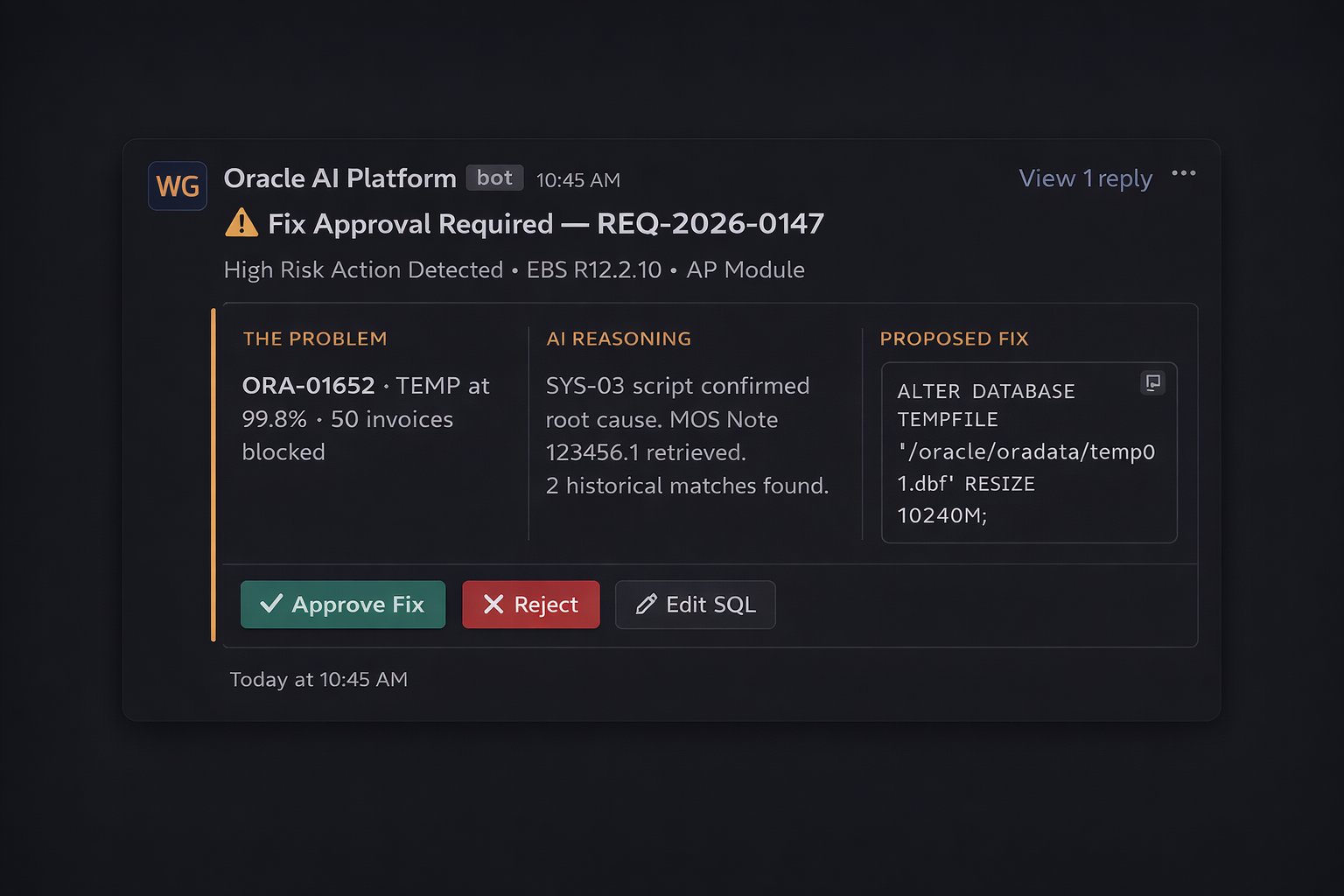
The complete case presented to the DBA in Slack — three panels of evidence and one decision to make. Total review time: approximately 90 seconds.
Fix Executes. Audit Record Written. Knowledge Stored.
n8n validates the JWT approval token and executes the exact SQL shown in the notification — no substitution, no modification. The TEMP tablespace extends from 5GB to 10GB. The 50 blocked invoices immediately resume processing. A signed audit record captures every detail: approver identity, exact SQL, before/after state, LLM reasoning summary, Oracle Support Note reference.
Then the resolution is vectorized and stored in Milvus. The next ORA-01652 incident in this environment will find this resolution in the knowledge base and benefit from it. The platform does not just solve the problem — it learns from it.
Total elapsed time: 0:04:08.
What This Means for Oracle DBA Work
This is not about replacing DBAs. An experienced Oracle DBA's value is in architectural decisions, complex performance tuning, critical data model design, and the judgment calls that no AI should make autonomously. The forty-five minutes spent confirming that TEMP is at 99.8%, searching MOS for the right article, and writing an ALTER SYSTEM command is not where that value is being created.
The Oracle AI platform is built on the premise that DBAs should spend their time on the problems that genuinely require expert judgment — and that the diagnostic, retrieval, and documentation work surrounding those problems can be automated safely, with the right governance layer in place. Four minutes and eight seconds for ORA-01652 is the proof of concept. The same architecture applies to every Oracle error code, every AP hold pattern, and every concurrent manager failure in the diagnostic script library.