ORA-01652: Invoices Stuck in INCOMPLETE
ORA-01652 fires when Oracle cannot extend a temporary segment because the TEMP tablespace has run out of space. In an AP environment, this surfaces as invoices stuck in INCOMPLETE status — blocking payment processing, GL transfer, and period close. The platform handles the entire resolution sequence from alert to fix.
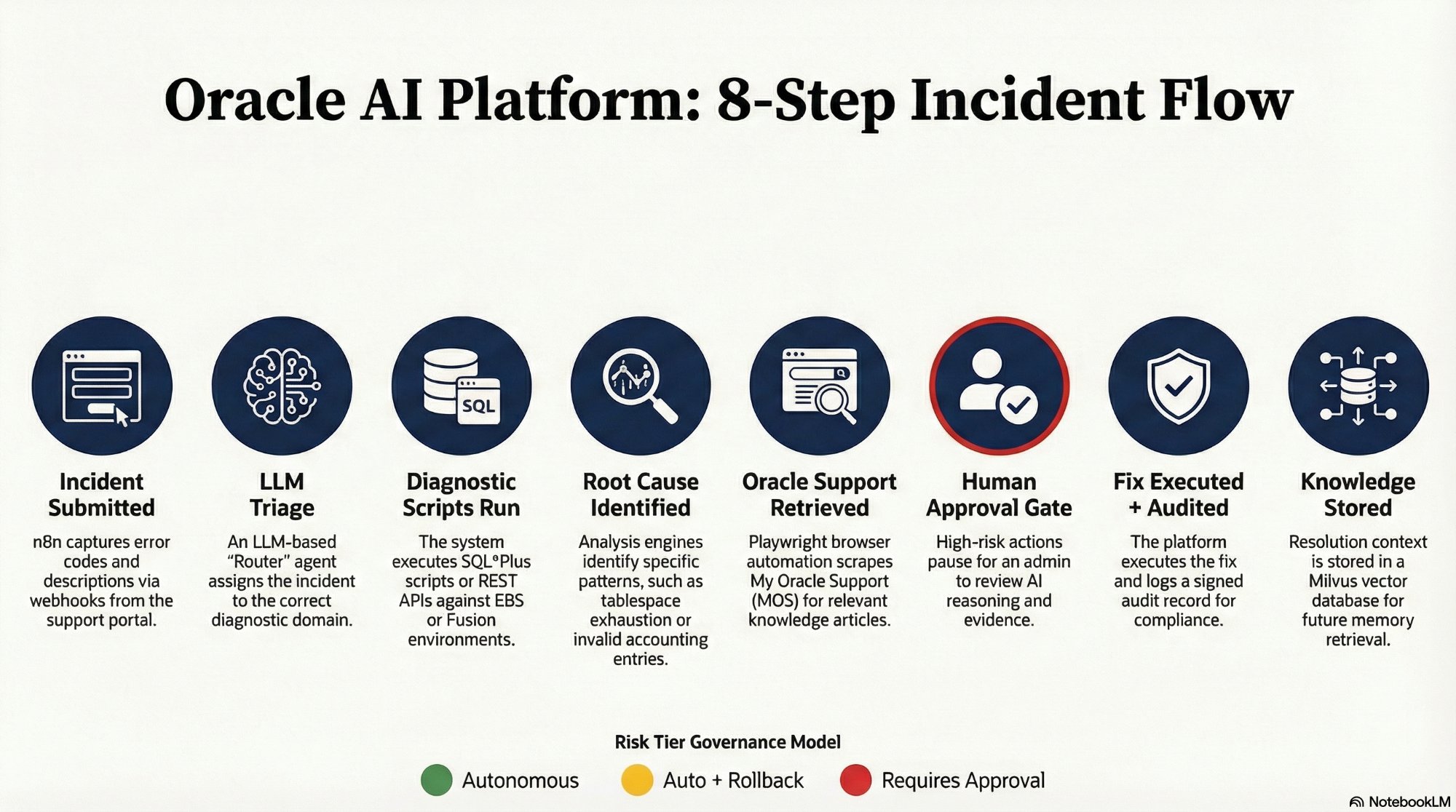
The complete 8-step sequence at a glance. Scroll down for the full technical detail of each step.
Incident Submitted
A user submits "Invoices stuck in status INCOMPLETE with ORA-01652" through the Oracle AI support portal. The portal captures the error code, module, description, and Oracle environment version as a structured JSON payload sent to an n8n webhook listener.
{
  "error_code": "ORA-01652",
  "module": "AP",
  "description": "Invoices stuck in INCOMPLETE status",
  "environment": "EBS R12.2.10",
  "priority": "HIGH"
}n8n Webhook → LLM Router
Triage & Classification
The n8n webhook receives the JSON payload and passes it to an LLM-based router agent. The agent evaluates the error code, module, and description to classify the incident domain — in this case, a DBA-level tablespace issue — and dispatches the correct diagnostic workflow branch. Classification determines which diagnostic scripts run, which Oracle Support search terms are used, and which approval tier applies to the fix.
Script Agent → Oracle Database
Diagnostic Scripts Execute
n8n triggers the Tablespace Diagnostic Script from the 65-script library at scripts.williamagreen.com. The script executes via the n8n OracleDB node using JDBC, running structured SQL checks against the live database and returning results as normalized JSON for LLM analysis.
SELECT tablespace_name,
       used_percent,
       bytes_used,
       bytes_free
FROM   dba_tablespace_usage_metrics
WHERE tablespace_name = 'TEMP';LLM Analyst — Claude / GPT-4o
Root Cause Identified
The structured diagnostic output is passed to the LLM analysis engine. The model identifies root cause based on specific patterns in the script output, and also consults the RAG knowledge base for prior resolutions matching this error code and environment.
Tablespace: TEMP  |  Used: 99.8%  |  Free: 40MB

Root cause: TEMP tablespace exhaustion.
50 AP invoices cannot complete sort operations.
Resolution: Extend TEMP by 5GB minimum.Playwright Agent → My Oracle Support
Oracle Support Knowledge Retrieved
The Playwright browser agent activates using a pre-authenticated session stored in auth.json, navigates to My Oracle Support, searches "ORA-01652 TEMP Tablespace EBS R12", and extracts the Symptoms, Cause, and Solution sections from the top-ranked article. This retrieval runs in parallel with Step 4.
HITL Node → Lead DBA via Slack
Human Approval Required
Because extending a tablespace requires an ALTER SYSTEM command — a High-Risk DDL-level action — the platform executes its Safe-Stop sequence. n8n serializes the full proposed fix context and sends a Decision Tower notification to the lead DBA via Slack. The notification presents three panels of evidence: the problem, the AI reasoning path, and the dry-run result. The DBA sees Approve, Reject, and Edit SQL buttons directly in the Slack message.
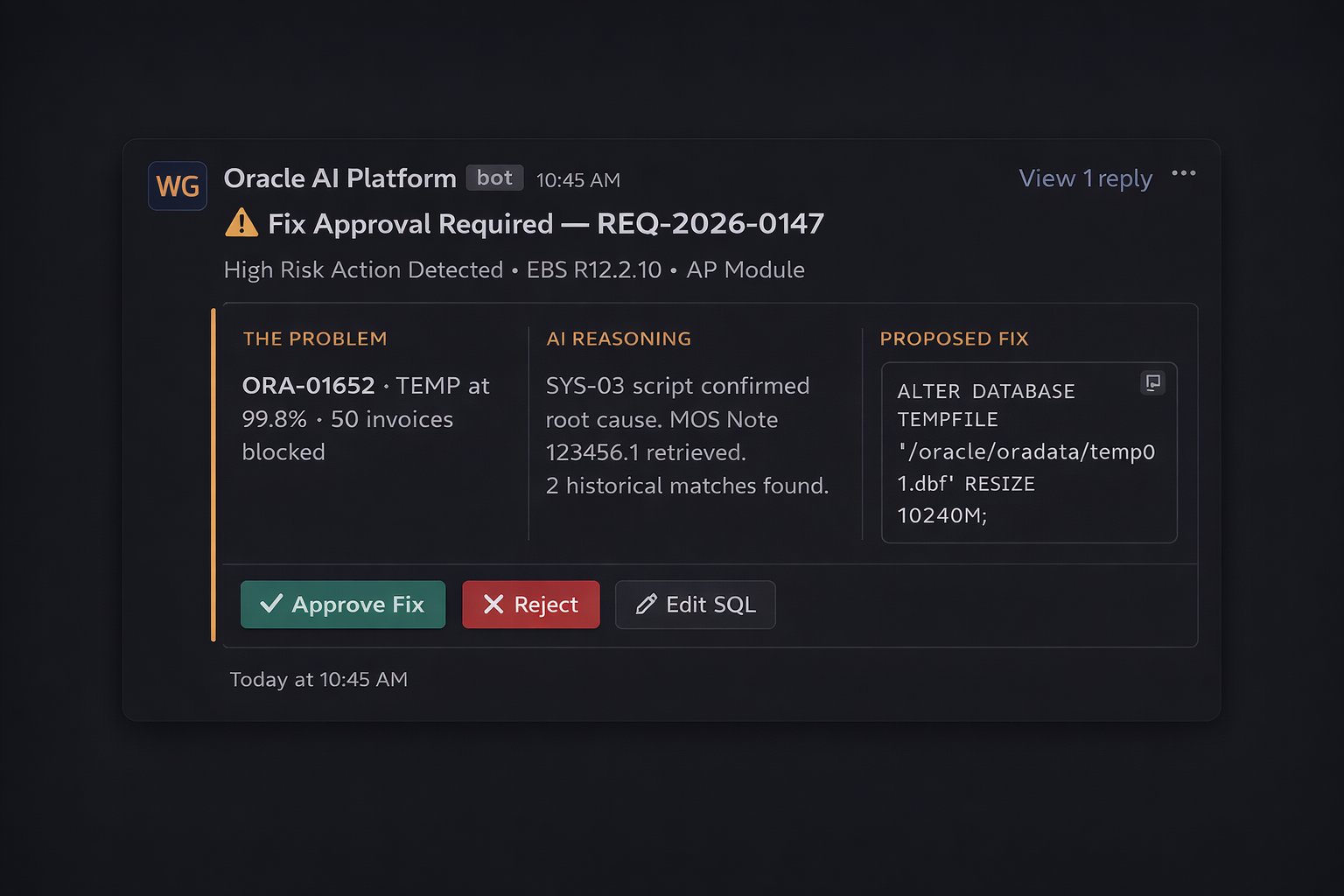
The Decision Tower notification as it appears in Slack — three evidence panels and three action buttons. The DBA's entire involvement is reviewing this card and clicking one button.
n8n → OracleDB Node
Fix Executed & Logged
Upon DBA approval, n8n validates the JWT authorization token and executes the fix via the OracleDB node using the exact SQL that was shown in the approval notification — no substitution, no modification. A signed audit record is written immediately after execution, capturing agent identity, approver identity, exact SQL run, and the before/after tablespace state.
ALTER DATABASE
  TEMPFILE '/oracle/oradata/temp01.dbf'
RESIZE 10240M;RAG Pipeline → Milvus
Resolution Stored for Next Time
The complete resolution package — diagnostic output, root cause analysis, Oracle Support Note reference, fix applied, DBA approval record, and verification result — is vectorized and stored in Milvus with enriched metadata. The next ORA-01652 incident in this environment retrieves this resolution immediately, reducing diagnosis time to near zero.